Cloning of Tables In Teradata
Learn how to clone tables in Teradata quickly and easily using the CREATE TABLE AS statement. Transfer statistics and definitions without wasting resources.

Table cloning is a frequently required task. Most likely, you are familiar with the conventional method of performing it.
- Retrieve the DDL statement of the table, which has to be cloned
- Create a copy of the table structure using this DDL
- Run an INSERT…SELECT into the empty table
Teradata provides an alternative approach with the following statement:
Want more practical data engineering analysis like this?
Join DWHPro Letters and get field-tested notes on Teradata, Snowflake, AI, migrations, performance, and enterprise data work. DWHPro Letters is free. Subscribe to get new issues by email.
CREATE TABLE <TABLENAME> AS <TABLE_TO_CLONE> WITH [NO] DATA [AND STATISTICS]You can choose to either create an empty table from the original structure or populate the cloned table from the existing one. Opting for the former eliminates the final step of the conventional approach.
Replacing the traditional cloning approach with the CREATE TABLE AS statement offers numerous benefits.
You can transfer statistics and definitions from the original table to the cloned table. Collecting statistics can be time- and resource-intensive. Using the cloning method, resources are not wasted on collecting statistics for the cloned table.
You can migrate the statistical definitions by creating a blank replica of the original table and excluding the data. Manually collecting statistics for the duplicated table would be a tedious undertaking.
In addition to the aforementioned advantages, the CREATE TABLE AS technique permits the creation and population of duplicate tables from SQL statements. This supports a broad range of SQL statements, such as joins and aggregations. Although it is possible to transfer statistics for SQL-based cloning, I choose not to, as the statistics transfer rules are rather complex. I prefer to keep things simple and avoid having to memorize those rules. Simplicity is the central reason for adopting this cloning method.
Here is an example of cloning based on a SQL statement:
CREATE TABLE <TABLE> AS (SELECT * FROM <TABLE_1>) WITH DATA;Rules for Cloning of Tables in Teradata and column attributes
When duplicating tables from SQL statements, various rules for transferring table and column attributes are enforced.
Get the next issue by email.
The key rule to remember is:
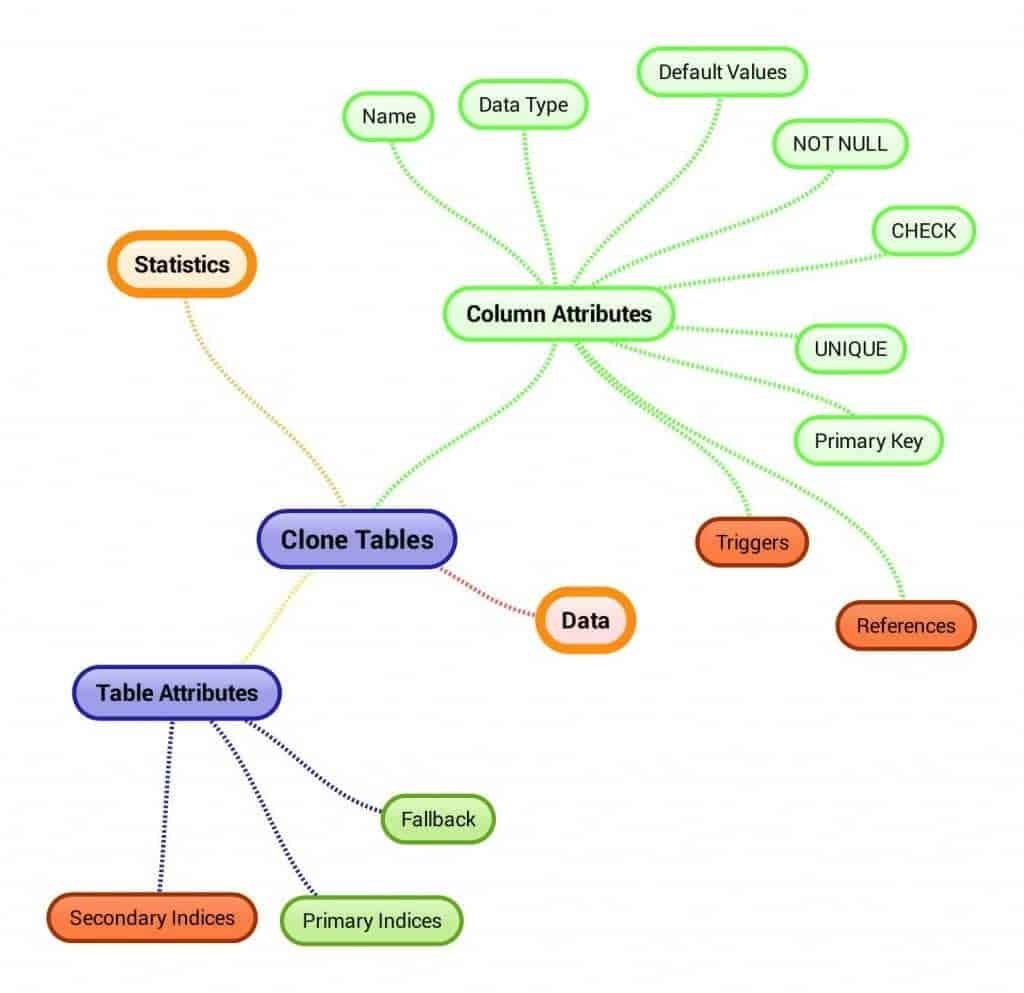
- If you clone a table, all attributes are cloned as well.If you clone based on a SQL statement, attributes are not cloned.
While there may be exceptions, this rule of thumb will usually suffice.
Below are the attributes transferred in table cloning. Green attributes are preserved, while red attributes are lost.
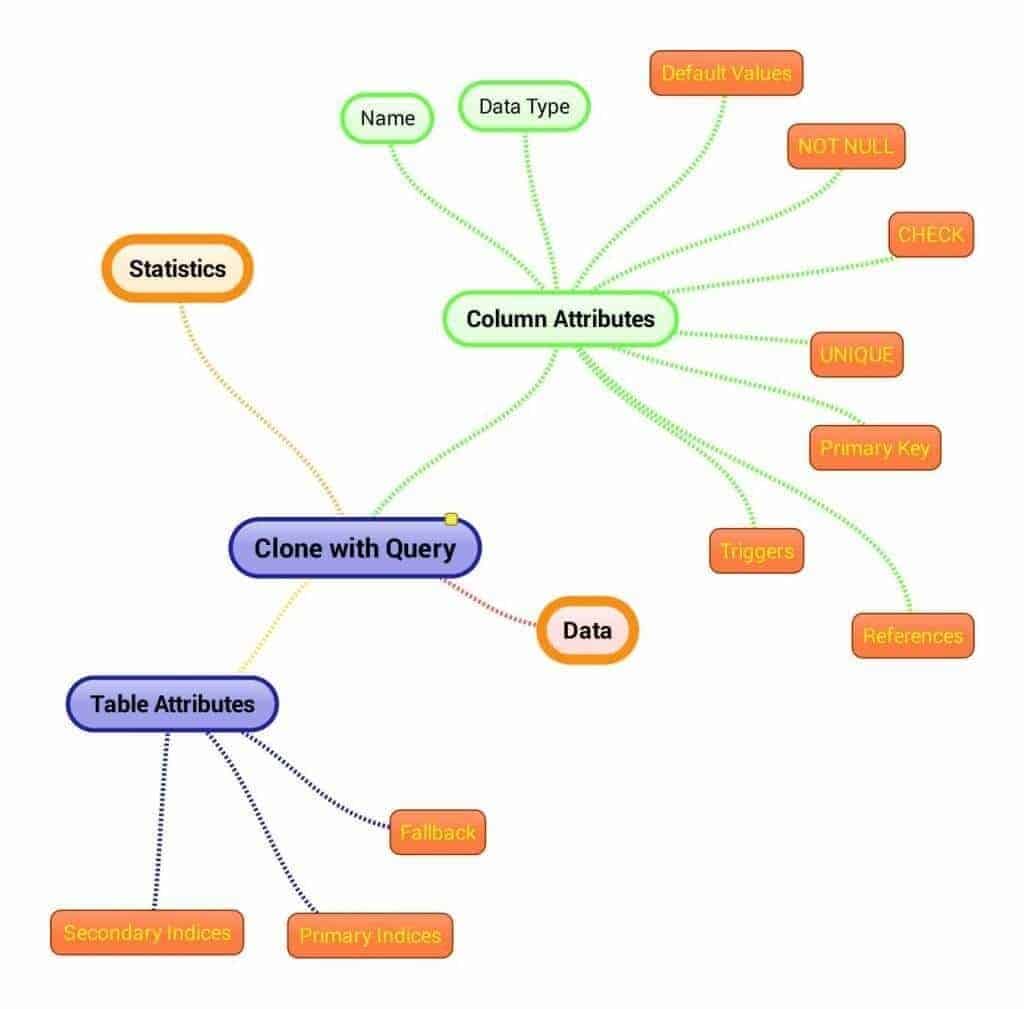
When cloning from a SQL statement, only the column name and data type are transferred.
Changing the attributes during cloning
Table and column attributes can be modified during cloning.
If permitted by the SQL syntax, you may modify the column attribute directly in the SQL statement as shown below, wherein the data type attribute is being altered:
CREATE TABLE <TABLENAME> AS(SELECT CAST(A AS INTEGER)FROM <TABLE_1>) WITH DATA;Certain attributes cannot be altered this way, as modifying them would result in invalid SQL syntax. To address this scenario, the following syntax can be applied (in this instance, the NOT NULL constraint is appended to column A):
CREATE TABLE <TABLENAME> ( A NOT NULL) AS(SELECT AFROM <TABLE_1>) WITH DATA;Don't fall into the primary index trap
To avoid unpleasant performance issues, it is essential to internalize the cardinal rule of cloning.
Defining the primary index is necessary when cloning from a SQL statement. Failure to do so will result in Teradata utilizing the first column of the cloned table as the non-unique primary index, which may cause data skewing and performance issues. It is imperative to remain vigilant of this potential problem.
The following example shows an omitted primary index definition, which causes Teradata to select A as the non-unique primary index for the clone table:
CREATE TABLE <TABLENAME> AS (SELECT A,B FROM <TABLE_1> WITH DATA;It is essential to provide a correct primary index definition, even if it is the first column in the table.
CREATE TABLE <TABLENAME> AS (SELECT A,B FROM <TABLE_1> PRIMARY INDEX (B) WITH DATA;Simplify your life by using the CREATE TABLE AS statement. While it offers multiple options, I suggest selecting only those that simplify your work without requiring you to memorize numerous rules.
- Decide if data should be copied
- Determine if the statistics should be transferred, but use it only if cloning a table (no SQL statement cloning)
- Internalize which attributes are copied in the table and SQL statement cloning. As a rule of thumb: table cloning transfers all attributes, and SQL statement cloning moves none
- Remember the two possibilities to change attributes during cloning
Check out this guide to FastLoading on Teradata: The Fundamentals of FastLoading on Teradata.
Planning or surviving an enterprise data platform migration?
I write regularly about the performance, cost, architecture, and project mistakes that show up in real Teradata, Snowflake, Databricks, and enterprise data work.
Subscribe for free and keep launch access.
Written by Roland Wenzlofsky, founder of DWHPro and author of Teradata Query Performance Tuning. DWHPro has helped data warehouse practitioners for 15+ years.