Teradata Dynamic Workload Management Features: What You Need to Know
Teradata Active System Management (TASM) offers dynamic workload management features that allow workload adaptation based on system conditions. Learn more here.

TASM systems exclusively offer dynamic workload management features, which TIWM does not provide.
What is Teradata Dynamic Workload Management Features?
TIWM focuses exclusively on static workload definitions, with a few exceptions. In contrast, TASM provides capabilities that enable us to adjust workload management to specific system conditions dynamically.
Dynamic changes rely solely on events. TASM categorizes events as either time-based (entering or exiting a pre-determined time window) or system-specific (exceeding the predetermined limit of AMP worker tasks (AWTs) in use).
TASM refers to events specific to a system as "health conditions" and events based on time as "planned environments".
The distinction is logical: Time-based occurrences are consistently scheduled. You specify a time frame that begins once a particular time is reached. Conversely, health conditions are not foreseeable or prearranged. Depending on the load on the system, a health condition is triggered, but it is impossible to predict when (or if) it will occur.
As the workload designer, you have the discretion to choose the number of planned events and health conditions to define. The simplest scenario involves only one planned environment, which is the default option referred to as "Always," and one health condition known as "Normal."
Two planned environments are often employed: one for daytime operations, which safeguards reporting users and applications, and another that prioritizes nightly batch loads. The state matrix below displays two health conditions ("1" and "2") and two planned environments ("day" and "night"). Each orange box represents a state defined by a distinct set of workload rules (we have named them to facilitate identification).
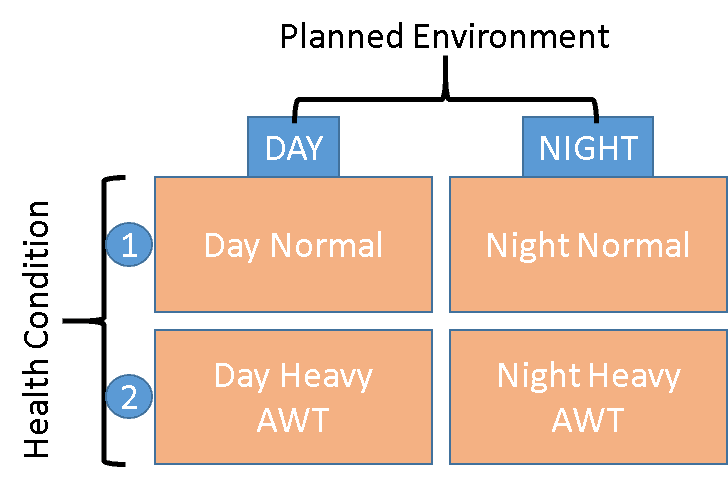
TASM State Switching
TASM periodically monitors for pertinent events, starting with health conditions. The following step involves detecting a change to a planned environment. Each check may involve one or both types of events. Teradata will apply the corresponding state's workload management rules if any event occurs.
Teradata will select the rightmost planned environment from the state matrix if multiple matches are found during the check. Moreover, the health condition closest to the bottom of the state matrix will be selected in case of multiple matches.
The QueryLog and Dynamic Workload Management
The DBC.DBQLOGTBL table conveniently identifies each request and the corresponding environment and health conditions in which Teradata executed it. This tool is invaluable for skilled Teradata tuning experts, enabling them to analyze performance problems and detect improperly assigned queries.
The columns below contain pertinent data:
OpEnvId = Planned Environment
SysConId = Health Condition
The LastStateChange column displays the timestamp of the planned environment activation by Teradata, providing additional assistance.