Microsoft Fabric vs. Databricks: What Enterprise Teams Actually Need to Know
When Microsoft launched Fabric, it promised to unify analytics under one roof. Databricks, meanwhile, has been building its lakehouse…
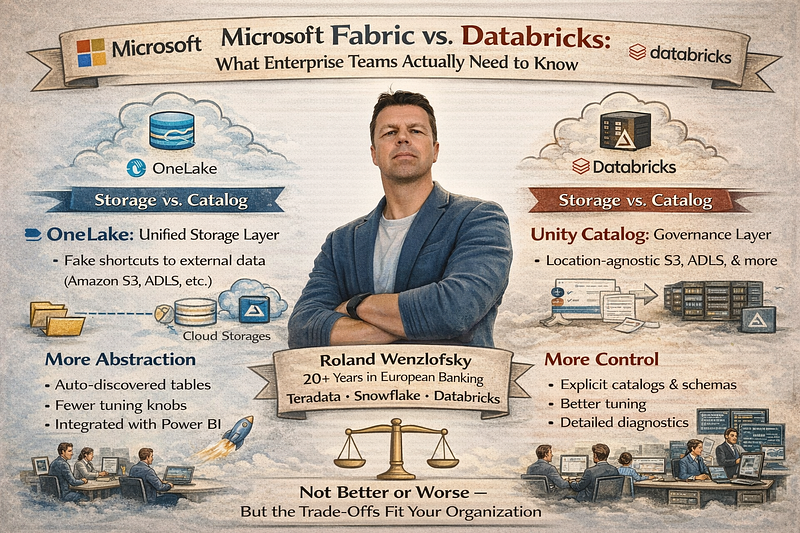
When Microsoft launched Fabric, it promised to unify analytics under one roof. Databricks, meanwhile, has been building its lakehouse platform for years. Both aim to be your central data platform — but they make fundamentally different bets on how much complexity to show you.
Having worked across Teradata, Snowflake, and Databricks environments in European banking and insurance for over 20 years, I’ve seen this pattern before. The question is never “which platform is better?” It’s “Which trade-offs fit your organization?”
The Architecture Split: Storage vs. Catalog
The difference starts at the foundation.
Want more practical data engineering analysis like this?
Join DWHPro Letters and get field-tested notes on Teradata, Snowflake, AI, migrations, performance, and enterprise data work. DWHPro Letters is free. Subscribe to get new issues by email.
OneLake, Fabric’s storage layer, acts as a single unified data lake per organization — or per tenant (Mandant), as it’s called in the Microsoft world. Think of it as OneDrive for analytical data. Everything lives under one logical namespace. When you need to access data sitting elsewhere — in Azure Data Lake Storage, Amazon S3, or another lakehouse — you create a shortcut. It’s essentially a symbolic link that makes remote data appear local. No ETL, no copying.
Databricks takes a different approach. Your data lives wherever you put it — S3, ADLS, GCS — and Unity Catalog provides the governance layer on top. You register external tables that point to data in cloud storage. The table definition lives in the catalog; the data lifecycle is managed outside of Databricks.
The practical distinction: OneLake shortcuts are a storage-level abstraction (remote data appears as local files), while Databricks external tables are a catalog-level abstraction (remote data is registered as queryable objects).
Both avoid data duplication. Both leave your source data untouched if you delete the reference — drop an external table in Databricks or remove a shortcut in Fabric, and only the metadata disappears. The underlying files stay exactly where they were.
The Visibility Question: Explicit vs. Hidden Complexity
This is where the philosophical divide gets interesting.
Databricks makes Unity Catalog a first-class citizen. You work with a three-level namespace — catalog.schema.table — and you're expected to understand it. You create catalogs, assign them to workspaces, define schemas, set permissions at each level, and consciously decide whether a table is managed or external. It's powerful, but it demands competence.
Fabric abstracts most of this away. Under the hood, there absolutely is a metastore — built on Delta Lake with a metadata layer. But you interact with lakehouses and workspaces, not catalogs. Create a lakehouse, drop files in, and Fabric auto-discovers tables, registers them, generates a SQL endpoint, and makes everything visible in Power BI. You rarely think about catalog plumbing.
If you work with enterprise data platforms, migrations, performance tuning, or AI-driven delivery teams, DWHPro Letters is written for you. Get the next issue by email.
This reflects their target audiences. Databricks assumes data engineers and platform teams who want fine-grained control. Fabric targets a broader group — including analysts and BI developers — who just want things to work.
Easier to Start vs. Easier to Master
Here’s where I push back on the narrative that Fabric is simply “easier.”
Hiding complexity and eliminating complexity are two very different things. The complexity is still there. It’s just behind a curtain. And that creates real problems in enterprise environments.
Diagnostics. When something breaks in Databricks, you can dig into the Spark UI, check catalog permissions, and trace execution plans. In Fabric, you’re more dependent on whatever Microsoft chooses to surface.
Tuning. Fabric makes opinionated defaults for you — compute sizing, caching, file layout, optimization. When those defaults don’t fit your workload, you have fewer levers to pull. Databricks gives you more rope. You can hang yourself with it, but you can also build exactly what you need.
Cost transparency. This is the one industry that regulated industries should care about most. Fabric’s capacity-based pricing bundles everything together. Databricks itemizes compute, storage, and features more explicitly.
This is the same pattern we’ve seen in the Snowflake world. No indexes, no tuning knobs, auto-scaling warehouses — great until you get the bill and can’t explain why a query consumed 200 credits.
What This Means for Regulated Industries
In European banking, insurance, and telecom, the ability to audit and govern your platform usually outweighs ease of onboarding. Auditors want to see clearly defined governance hierarchies, explicit access controls, and traceable data lineage.
Databricks with Unity Catalog gives you this directly — the three-level namespace maps cleanly to organizational governance structures. Fabric can achieve similar outcomes, but you’ll lean more heavily on workspace-level security and Microsoft Purview integration to satisfy compliance requirements. It works, but it’s a different path.
The Bottom Line
Fabric is easier to start with. Databricks is easier to master.
Which one matters more depends on your team’s maturity, your governance requirements, and how much you need to understand what’s happening under the hood. For a self-service analytics team building dashboards, Fabric’s integrated experience is compelling. For a data engineering team running complex pipelines across regulated environments, Databricks’ explicit control pays dividends.
The honest answer — as always in enterprise data — is that the best platform is the one your organization can actually operate and govern.
Roland Wenzlofsky is the founder of DWHPro, a Vienna-based data warehouse engineering consultancy. A Teradata Certified Master with 20+ years of experience in enterprise data warehousing across European banking, insurance, and telecom, he serves as a vendor-neutral advisor across Teradata, Snowflake, and Databricks. He is the author of “Teradata Query Performance Tuning”
Planning or surviving an enterprise data platform migration?
I write regularly about the performance, cost, architecture, and project mistakes that show up in real Teradata, Snowflake, Databricks, and enterprise data work.
Subscribe for free and keep launch access.
Written by Roland Wenzlofsky, founder of DWHPro and author of Teradata Query Performance Tuning. DWHPro has helped data warehouse practitioners for 15+ years.