Optimizing the Tactical Workload in Teradata: Skills and Tools Needed
Learn about tactical workload tuning in Teradata, which requires unique skills and tools. This article covers the skills needed to optimize tactical queries and highlights the difference between tactical and decision support workloads. Discover the Tactical Workload Toolkit and how to use join index

What is the tactical workload in Teradata?
Tactical workload tuning is a specialized discipline in Teradata that demands distinct skills and tools.
This article will demonstrate the necessary skills for optimizing tactical workload.
You will acquire expertise in utilizing appropriate tools and mastering the "tactical workload skill set."
Want more practical data engineering analysis like this?
Join DWHPro Letters and get field-tested notes on Teradata, Snowflake, AI, migrations, performance, and enterprise data work. DWHPro Letters is free. Subscribe to get new issues by email.
The Difference between Tactical and Decision Support Workload
Decision support workloads typically require full table scans and all-row joins, often between large tables. While indexing (such as NUSI or USI) can enhance performance, it results in more frequent access to all table rows.
Here is an example of a query for decision support:
SELECT CustomerGroupName, SUM(Revenue)FROMSales t01INNER JOINCustomerGroup t02ONt01.GroupCd = t02.GroupCdGROUP BY 1;
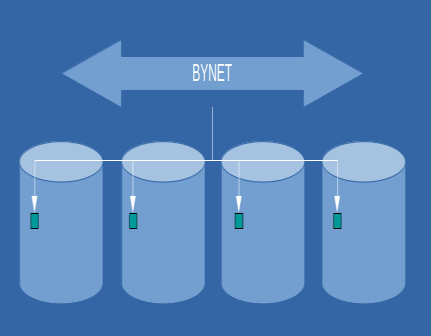
Tactical queries typically involve accessing a single row or a limited number of rows. An illustration of such a query is:
SELECT *FROM SalesWHERE SalesId = 100;
Efficient tactical queries require indexed access paths, such as UPI, NUPI, NUSI, USI, Join Indexes, or a partition containing only one row. The ultimate objective is to produce an execution plan that retrieves solely one or a few rows at each stage.
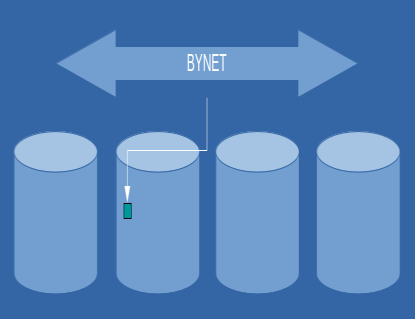
Apply your query's tactical selection criteria as early as possible in the execution plan to avoid deadlocks. However, serialization may not be feasible for optimal performance. Optimize by rewriting frequently executed statements, minimizing database changes, and preventing deadlocks. A well-designed query ensures stable tactical execution and maintains performance even as table cardinality grows. In contrast, decision support queries tend to slow down with increasing data volume.
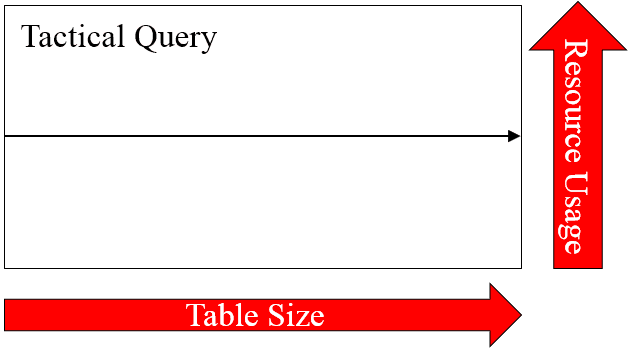
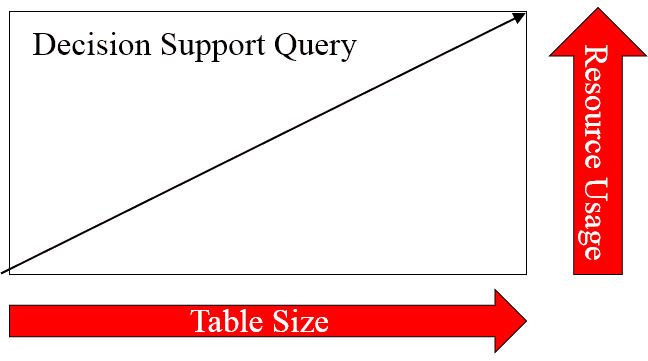
Increasing the number of Teradata nodes does not enhance tactical query performance. However, it enables multiple tactical queries to be executed concurrently.
The efficiency of decision support queries increases proportionally with the number of nodes. In the absence of data skewing, doubling the number of nodes can result in a twofold acceleration of your query. However, it should be noted that perfect parallelism and zero skewing are unattainable theoretical concepts in practice.
The Tactical Workload Toolkit
To optimize retrieval processes, we must use indexed access for individual rows (such as USI, UPI, NUSI, Join Index, etc.) and minimize the number of AMPs employed in join operations.
The query's execution plan reveals that the chosen row is retrieved from a single AMP (single-AMP join step).
SELECT * FROM Sales s INNER JOIN SalesDetails sd ON s.SalesId = sd.SalesId WHERE s.SalesId = 100; 1)First, we do a single-AMP JOIN step from Indexing.t01 using the primary index "Sales.s.SalesId = 100"with no residual conditions, which is joined to Sales.SalesDetails by way of the primary index "Sales.sd.SalesId = 100"with a residual condition of (“Sales.SalesDetails.SalesId = 100"). Sales.Sales and Sales.SalesDetailsare joined using a merge join, with a join condition of ("Sales.Sales.SalesId = Sales.SalesDetails.SalesId").The result goes into Spool 1 (one-amp), built locally on that AMP.The size of Spool 1 is estimated with low confidence to be 151 rows.Consistent performance can be achieved in tactical workload tuning by ensuring stable and direct data access, assuming the execution plan remains unchanged.
The Nested join is the optimal join type for the tactical workload.
When creating your physical data model, consider a design that enables the utilization of Nested Joins.
Business users frequently require data retrieval using natural keys instead of surrogate keys. Retaining the natural keys in the physical data model for tactical operations is advisable.
This physical data model employs Nested Joins.
CREATE TABLE Sales
(
ProductId INTEGER NOT NULL,
SalesId INTEGER NOT NULL
) PRIMARY INDEX (ProductId );
CREATE TABLE Products
(
ProductId INTEGER NOT NULL,
ProductCode CHAR(10)
) PRIMARY INDEX (ProductId )
UNIQUE INDEX (ProductCode);In the aforementioned example, the data is accessed through the "ProductCode" key instead of the surrogate key, "ProductId." Hence, a unique secondary index (USI) is employed to establish a direct access route for the data via the natural key.
Get the next issue by email.
SELECT * FROM Products p INNER JOIN Sales s ON p.prod_id = s.prod_id WHERE ProductCode = ‚Private‘
1)First, we do a two-AMP JOIN step from Sales.Products by way of unique index # 4“Sales.p.ProductCode = ‘Private’" with no residual conditions, which is joined to Indexing.s byThe way of unique index # 4 “Sales.s.ProductId = Sales.p.ProductId" with no residual conditions.Sales.p and Sales.s are joined using a nested join, with a join condition of ("(1=1)").The result goes into Spool 1 (one-amp), which is built locally on the AMPs.
The tactical query is resolved through a Nested Join utilizing the USI on the ProductCode column.
Forcing all Rows to one AMPTo perform tactical queries on small tables, we can use a tool that involves forcing all rows onto a single AMP. To achieve this, we add a column to the small table and populate it with a single value, ensuring that this column is set as the table's primary index. This is an effective method for executing tactical queries on smaller datasets.
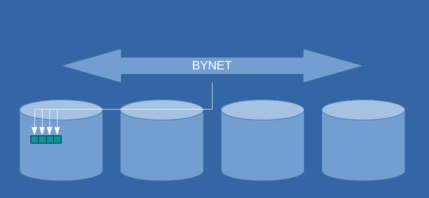
Assigning a single value to the primary index column will compel all rows in the table to be directed to a single AMP. If the table is small enough, all rows may even be placed into a single data block.
If all goes as planned, this yields a one-AMP retrieval instead of performing a scan on all AMPs.
Simultaneously executing numerous tactical queries on the table will keep the entire table in memory, negating the need for disk drive access.
When utilizing this approach for multiple tables, it is advisable to employ distinct primary index values for the "dummy" column to prevent overburdening a single AMP.
A Case Study: Tactical Workload and Join Indexes
I recently participated in optimizing a web frontend tool that employs Teradata as its backend database.
During development, the tactical nature of the queries executed against the database went unrecognized. The tool primarily generated workloads consisting of full table scans.
The web tool underwent testing on a development system. However, numerous individuals commenced concurrent and excessive workloads upon transitioning to production. The primary concern pertained not to the magnitude of the tables in question, given that they were all relatively small.
The core issue was a combination of user expectations when using the website interface and the workload management configuration, which failed to categorize tool queries as tactical tasks.
Meeting users' expectations for a quick response time, typically within a few seconds, proved unattainable under heavy system loads due to the inefficiency of full table scans. As a user, it is understandable that waiting 30 seconds to save a single client's information is less than ideal.
The primary queries had optimum run times of 1-2 seconds, although they could extend to several minutes in a high-volume environment. Additionally, workloads experienced delays that contributed to the overall response time.
Although I introduced additional secondary indexes, since the tables were small, the optimizer concluded that carrying out a full table scan of the primary table would be a more cost-effective alternative to the indexed approach.
Using join indexes proved to be the ultimate solution. Since the tool necessitated distinct data access paths, I established multiple 1:1 join indexes for every table to accommodate each access path, modifying only the primary index of the join index.
It is important to monitor the effects of update, insert, and delete statements when adding join indexes. However, this was not an issue for me since the tables were small.
My experience involved numerous join indexes leading to frequent deadlocks.
To address this issue, various solutions are available. One such approach involves serializing the user session activities through a dedicated "serialization" table. Before modifying any data, each session must acquire a write lock for each activity on this table.
To mitigate deadlocks in my project, I revamped the crucial code segments and curtailed the frequency of alterations (updates, deletes, inserts) performed on the tables.
Collect statistics on the join indexes to ensure their utilization.
Explore these resources for optimizing Teradata SQL performance:
6 Golden Rules for Teradata SQL Tuning, The Teradata Join Index Guide - Comprehensive Answers, and Boost Performance with the Teradata Nested Join.
Feel free to inquire in the comments section if you require any clarification regarding the aforementioned information. I will diligently monitor the comments and endeavor to respond to as many as possible. Thank you for perusing this blog; its evolution is solely due to your support.
Planning or surviving an enterprise data platform migration?
I write regularly about the performance, cost, architecture, and project mistakes that show up in real Teradata, Snowflake, Databricks, and enterprise data work.
Subscribe for free and keep launch access.
Written by Roland Wenzlofsky, founder of DWHPro and author of Teradata Query Performance Tuning. DWHPro has helped data warehouse practitioners for 15+ years.