Teradata Identity Columns: Features, Benefits, and Syntax
Learn about the features and benefits of Teradata Identity Columns, and why they are used for transactional and bulk inserts. Discover the data types, syntax, and more.

What are the Features of the Teradata Identity Columns?
What is a Teradata Identity column?The Teradata identity columns feature generates unique numbers for each row inserted into a table. We use Identity columns for transactional and bulk inserts.
What are the key benefits of a Teradata Identity Column?• It is the easiest way to ensure row uniqueness without the performance disadvantage of unique constraints.
• Unique identifiers can be generated within the database and ensure integrity. Creating unique identifiers on the application level would be much more complicated and error-prone.
• As a Primary Index, the Teradata Identity columns ensure even data distribution across the AMPs.
• The identity column can be used to create primary keys of entities.
• Teradata Identity columns simplify application logic and the maintenance tasks for database administrators.
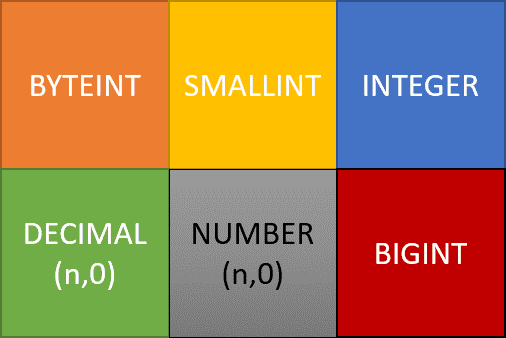
Which data types can be used for Identity columns?Integer Columns (INTEGER, BIGINT, etc.), including columns of type DECIMAL without decimal places (DECIMAL(10,0)).
What are the advantages compared to other methods of generating numbers?The main advantage is the error-free generation of unique values on the application level. Using the identity columns as a primary index also ensures a perfect distribution of the rows across all AMPs.
Is it guaranteed that Teradata does not create duplicate numbers?Uniqueness is only guaranteed if we define the identity columns with the GENERATED ALWAYS and NO CYCLE options. We will present these two options later in this article.
Are identity columns supported by the load utilities (Fastload, Multiload, etc.)?Yes, identity columns support both transactional inserts and bulk loads.
Are the generated numbers in ascending order and without gaps?No, because the way the numbers are generated (for performance reasons) does not allow this. If you need ascending numbers without gaps, ROW_NUMBER() is more suitable.
What is the syntax for creating a table with an Identity Column?Here is an example:
CREATE TABLE Customer
(
CustomerId BIGINT GENERATED ALWAYS AS IDENTITY
(START WITH 1 INCREMENT BY 1 MINVALUE 100 NO CYCLE),
LastName VARCHAR(255),
FirstName VARCHAR(255)
) PRIMARY INDEX (CustomerId);
What is one of the main applications for identity columns?Creating Surrogate Keys.
What happens in the case of NO CYCLE when MAXVALUE is reached?Teradata returns the following error: "*** Failure 7545 Numbering for Identity Column Customer. CustomerId is over its limit."
Where can I see the value range of an identity column (current value, maximum value, minimum value, etc.)?Teradata stores information about identity columns in table DBC.IDCOL:
CREATE SET TABLE DBC.IDCOL
(
TableId BYTE(6) NOT NULL,
DatabaseId BYTE(4) NOT NULL,
AvailValue DECIMAL(18,0) FORMAT '----,---,---,---,---,--9' NOT NULL,
StartValue DECIMAL(18,0) FORMAT '----,---,---,---,---,--9' NOT NULL,
MinValue DECIMAL(18,0) FORMAT '----,---,---,---,---,--9' NOT NULL,
MaxValue DECIMAL(18,0) FORMAT '----,---,---,---,---,--9' NOT NULL,
Increment INTEGER FORMAT '--,---,---,--9' NOT NULL,
Cyc CHAR(1) CHARACTER SET LATIN UPPERCASE NOT CASESPECIFIC NOT NULL)
UNIQUE PRIMARY INDEX (TableId);
The query below shows the details of all identity columns:
SELECT
"StartValue",
"MinValue",
"MaxValue",
"Increment",
Cyc,
AvailValue,
CAST(dbase.databasename AS VARCHAR(255)) DatabaseName,
CAST(dbc.tvm.tvmname AS VARCHAR(255)) TableName
FROM
dbc.idcol
INNER JOIN
dbc.tvm
ON
dbc.idcol.databaseid = dbc.tvm.databaseid
AND dbc.idcol.tableid = dbc.tvm.tvmid
INNER JOIN
dbc.dbase
ON
tvm. DatabaseId = dbase. DatabaseId;
What Are The Most Important Options Of The Teradata Identity Column?
- GENERATED ALWAYS: Always generates a value, whether or not the query passes a value.
- GENERATED BY DEFAULT: Generates a value only if the column value delivered in the SQL insert statement is NULL. We can use this property to copy existing data to a table with an identity column.
- START WITH: The first number used in the system-generated numeric sequence.
- INCREMENT BY: The step size by which each generated number gets incremented (one by default).
- MINVALUE: The minimum value to which a generated number can decrement. If MINVALUE is not specified, -2,147,483,647 is used (the minimum value for INTEGER).
- MAXVALUE: The maximum value by which a generated number can increment.
- CYCLE: Defines whether Teradata can reuse already generated values when it reaches the defined minimum or maximum values for an identity column.
The Teradata Identity Column and Performance
Loading data into a table that includes an Identity Column results in additional overhead. This is because each Virtual Processor (VPROC) is required to retrieve a range of numbers from DBC.IdCol and store them in its local cache.
Nevertheless, the initial overhead is transitory since Teradata subsequently retrieves the numeric data from its cache.
Will a VPROC only receive a new range of numbers once it has exhausted its current supply? Generating several thousand identification column values can be accomplished in just a matter of seconds.
Want more practical data engineering analysis like this?
Join DWHPro Letters and get field-tested notes on Teradata, Snowflake, AI, migrations, performance, and enterprise data work. DWHPro Letters is free. Subscribe to get new issues by email.
To enhance bulk insert performance, it is advisable to augment the DBSControl setting IdColBatchSize. This will lead to fewer accesses to the DBC.IdCol table in order to obtain a fresh range of numbers.
Get the next issue by email.
Improved performance is due to reduced updates on the DBC.IdCol table.
To account for potential data loss during loading or system restarts, optimal batch sizes must be determined based on the number of AMPs and larger batch sizes.
How are Teradata Identity Columns Generated?
Teradata identity column values generation relies on the row insertion method.
- INSERT...SELECT: The values are cached on the AMPs
- Single Row or USING clause: The values are cached on the Parsing Engine (PE)
Due to the independent and parallel functioning of VPROCs (AMPs or PEs), the generated numbers inserted into the table do not follow a chronological sequence.
Gaps may exist between the generated numbers, with larger gaps being more likely after system restarts, between loads, or when not all numbers are used.
Limitations Of Teradata Identity Columns
- Each table can only have one identity column.
*** Failure 3706 Syntax error: A table may not have multiple identity columns. - ALTER TABLE can't add an identity column
*** ALTER TABLE Failed. 3706: Syntax error: Cannot add new Identity Column option - Can't be part of a composite primary or secondary index
*** Failure 5784 Illegal usage of Identity Column CustomerId. - Can't be defined on Join Index, Hash Index, PPI Table
*** Failure 5784 Illegal usage of Identity Column CustomerId. - Can't be defined on secondary value ordered index bigger than 4 Bytes:
*** Failure 5466 Error in Secondary Index DDL, Order by column is non-numeric or is more than 4 bytes. - Can't be defined in Global Temporary Tables or Volatile Tables:
*** CREATE TABLE Failed. [5784] Illegal usage of Identity Column CustomerId - Identity Columns with GENERATED ALWAYS can't be updated.
*** UPDATE Failed. [5776] The GENERATED ALWAYS Identity Column CustomerId may not be updated. - Can't be defined on non-partitioned NOPI tables:
*** Failure 3706 Syntax error: The identity Column in a NOPI table is unsupported.
The linked Teradata article examines how Identity columns can be utilized for generating surrogate keys.
https://docs.teradata.com/reader/scPHvjfglIlB8F70YliLAw/WdfF9oz3QtNau24q2XvXXA
Planning or surviving an enterprise data platform migration?
I write regularly about the performance, cost, architecture, and project mistakes that show up in real Teradata, Snowflake, Databricks, and enterprise data work.
Subscribe for free and keep launch access.
Written by Roland Wenzlofsky, founder of DWHPro and author of Teradata Query Performance Tuning. DWHPro has helped data warehouse practitioners for 15+ years.