Teradata Queue Tables: Managing Live Events for Faster Business Responses
Introduction
In modern business, prompt response to opportunities and issues is crucial.
Detect and collect business events for prompt processing, generating either an alert for a front-line user or an update message for an operational system.
Teradata parallel database triggers handle live events precisely.
Want more practical data engineering analysis like this?
Join DWHPro Letters and get field-tested notes on Teradata, Snowflake, AI, migrations, performance, and enterprise data work. DWHPro Letters is free. Subscribe to get new issues by email.
A dashboard function checks the queue table for significant events every X minutes, filtering out unimportant ones and identifying a single serious shipper delay that could impact profitability. This is accomplished through the use of Teradata triggers, stored procedures, and queue tables that are straightforward to program and connect to production applications.
How does a particular Queue table work?
It resembles typical base tables but possesses the distinct characteristic of operating as an asynchronous FIFO queue.
When you create a queue table, you must define a TIMESTAMP column QITS (Queue Insertion TimeStamp) with a CURRENT_TIMESTAMP default value.
The column values in the queue table indicate the insertion time of rows, unless the user provides alternative values.
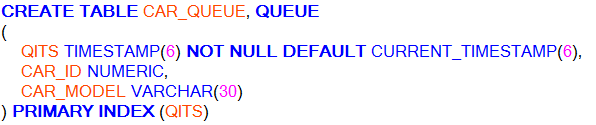
To add data to a database table, utilize an INSERT statement that functions as a first-in, first-out push.

The SELECT statement below operates similarly to a peek in a FIFO queue.

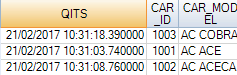
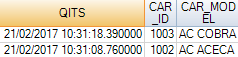
You can then use a SELECT AND CONSUME statement, which operates as a FIFO pop:


We perform a peek operation to review the previous pop. The outcome is accurate: the initial record was properly consumed.
If no rows are available, the transaction enters a delay state until one of the following actions occur:
• A row is inserted into the queue table
• The transaction aborts, either as a result of direct user intervention, such as the ABORT statement, or indirect user intervention, such as a DROP TABLE statement on the queue table.
Queue Tables and Performance
We must remain vigilant about the Queue tables.
1. Each time the system performs a DELETE, MERGE, or UPDATE operation on a queue table, the FIFO cache for that table is spoiled. The next INSERT or SELECT AND CONSUME request performed on the table initiates a full‑table scan to rebuild the FIFO cache, which impacts performance. So, you should code DELETE, MERGE, and UPDATE operations only sparingly, and these should never be frequently performed operations.
Limitations on Queue Tables
Creation or modification may not:
Questions?
If you have any questions about all this, please ask in the comments! I’ll be paying close attention and answering as many as I can. Thank you for reading. Whatever this blog has become, I owe it all to you.Planning or surviving an enterprise data platform migration?
I write regularly about the performance, cost, architecture, and project mistakes that show up in real Teradata, Snowflake, Databricks, and enterprise data work.
Subscribe for free and keep launch access.
Written by Roland Wenzlofsky, founder of DWHPro and author of Teradata Query Performance Tuning. DWHPro has helped data warehouse practitioners for 15+ years.