Improving Database Performance and Security with Teradata Write-Ahead Logging (WAL)

Accessing data has always been the bottleneck of database systems. Once the data resides in the main memory, it can be promptly processed.
Although SSDs are now predominantly used instead of hard disks, copying data into the main memory remains the slowest operation.
The Teradata Write-Ahead Logging (WAL) feature enhances DML performance and boosts data security.
Want more practical data engineering analysis like this?
Join DWHPro Letters and get field-tested notes on Teradata, Snowflake, AI, migrations, performance, and enterprise data work. DWHPro Letters is free. Subscribe to get new issues by email.
What is the Teradata Write-Ahead Logging (WAL)?The Teradata WAL increases DML statements' reliability and ensures that Teradata can recover changes during errors. The WAL also improves the performance of DML statements.
How does the Teradata WAL work?When a DML statement is executed, Teradata copies the affected data blocks from the disk into the main memory.
A copy of the rows to be changed is stored in the WAL log.
The data block is changed in the main memory and marked as modified but not written back to the disk.
The changed rows are written in the WAL log.
All locks are released. Other sessions can now change this data block, which is still in the main memory.
Later, the data block is finally written back to the disk. This is done in the background.
If the data block's size has not changed, it is written back to the same place.
A copy is written into the WAL depot to prevent a complete loss of the data block.
A complete loss could happen if the system fails while writing the data block. The block in the main memory is lost, but the block on the disk could be corrupted.
The copy in WAL Depot is unnecessary if the data block's size changes because it will be written to another place on the disk.
How does Teradata WAL affect performance?Since Teradata can execute several transactions on the same data block in memory, performance is improved because fewer IOs have to be executed.
The possible copy in the WAL repository is an additional IO but is necessary if an existing data block is overwritten.
The copies written to the WAL Log before and after a row are changed are single-row writes and, therefore, much more efficient than writing a data block.
Overall, WAL has a positive effect on performance. The additional IO into the WAL depot cannot be prevented, but collecting changes in the main memory reduces the number of IOs.
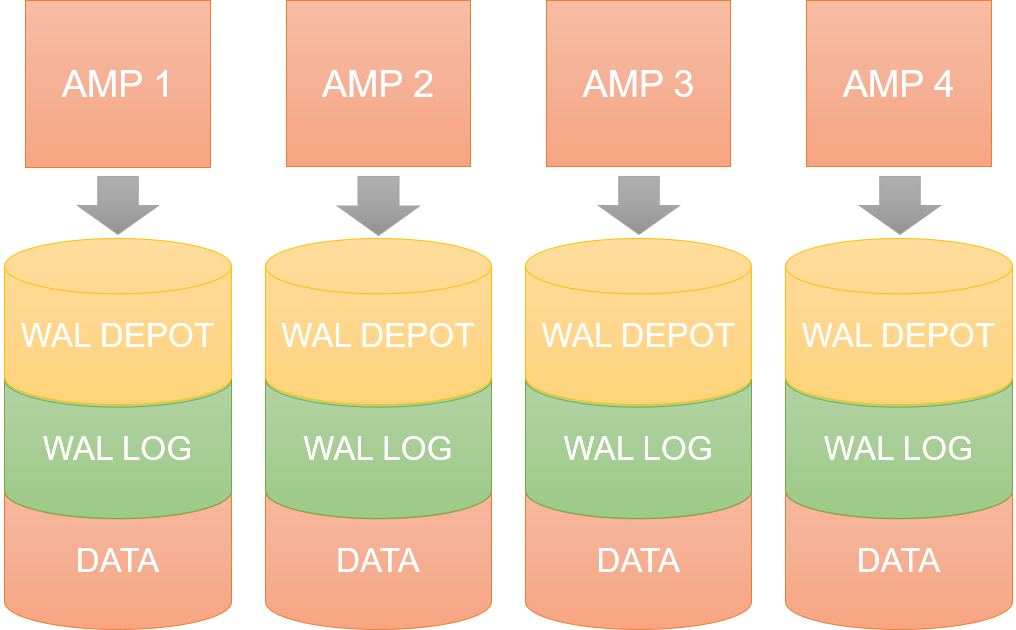
Where are the Teradata WAL Depot and the WAL Log stored?The WAL Depot is a fixed number of cylinders on each AMP if several possible blocks are written simultaneously.
The WAL Log requires a dynamic number of cylinders on each AMP.
Planning or surviving an enterprise data platform migration?
I write regularly about the performance, cost, architecture, and project mistakes that show up in real Teradata, Snowflake, Databricks, and enterprise data work.
Subscribe for free and keep launch access.
Written by Roland Wenzlofsky, founder of DWHPro and author of Teradata Query Performance Tuning. DWHPro has helped data warehouse practitioners for 15+ years.